Hirdetés
- Apple iPhone 13 mini - miért nem veszik elegen?
- Magisk
- Félmillió felett a kiszállított Xiaomi autók száma
- Samsung Galaxy A54 - türelemjáték
- Xiaomi 13T és 13T Pro - nincs tétlenkedés
- Samsung Galaxy A56 - megbízható középszerűség
- Samsung Galaxy S23 és S23+ - ami belül van, az számít igazán
- Fotók, videók mobillal
- Nothing Phone (1) - nem semmi (2)
- Xiaomi 15T - reakció nélkül nincs egyensúly
Új hozzászólás Aktív témák
-
Csak kijött az ördögi build

-
-
Teljesen leállítottad? Melyik build települt utána?
Nem tudom, most hogy működik, visszarakja-e a stabil buildet online vagy neked kell manuálisan újra telepíteni, de ha nem is állt le, akkor próbálj másik opciót választani az Insider leállításnál. Sajnos most nem tudom neked megnézni, melyiket, mert akárhányszor rányomok gondolkozik egy csomót és közben sajnos elszáll az explorer.exe és viszi magával az ablakot...
-
válasz
 Hofeher
#1670
üzenetére
Hofeher
#1670
üzenetére
[ADDED] If your PC appears stuck at “Preparing to install…” somewhere between the 80%-100% – please be patient and wait up to 30 minutes for this stage to complete.
Nálam viszont elkezdett az explorer.exe pár percenként újraindulni/összeomlik. Pedig nincs is notification, ahogy írják... jöhetne az új build
-
Going forward, Insiders in the Fast ring and in Skip Ahead will receive the same RS5 builds.
Szóval aki akar, most csatlakozzon a Skip Aheadhez

Ja és:
We fixed an issue resulting in the mouse cursor becoming invisible when hovering over certain UI elements and text fields in the last two flights.

-
Announcing Windows 10 Insider Preview Build 17655 for Skip Ahead
Known issues
We’re investigating an issue where the mouse cursor may disappear when hovering over certain UI elements and text fields. -
-
válasz
 westlake
#1644
üzenetére
westlake
#1644
üzenetére
Általánosan mondtam, hogy egy ilyen bug miatt nem kell(ene) egy frissítési folyamatot leállítani, ami most halasztás persze. Ha jól emlékszem RS3 is valami bődületes hibával jött ki, aztán jött hozzá a patch is rögtön.
Meg simán kiadtak közben is összegzőt, ami eltüntette a Store-t
Adják ki az RS5-öt, lehet, még az is jobb állapotban van most...
-
Nem léphetsz át addig skip aheadre már, amíg ki nem jön az RS4. Az utána jövő RS5 builddel lesz újra lehetőséged, így próbálnak több insiderrel tesztelni az aktuális builden.
Amikor mindig szétválik az aktuális és a következő RS build tesztelése, akkor tudod utoljára választani a skip aheadet, ha résen vagy, vagy épp azon voltál

-
-
Én szeretném Cortanat használni, ahogy a Google Asszisztenst is (PC-n is), magyarul, de továbbra sincs esély egyikre sem, pedig rég elég tökéletes beszédfelismerő rendszert használ mind a Nuance, mind a Google magyarul. Nyilván Cortanahoz csak az előbbit tudná licenszelni a Microsoft, ha egyáltalán akarná (és mondjuk nem belső megoldást fejleszt).
-
-
-
Announcing Windows 10 Insider Preview Build 17115 for Fast
There are currently no known issues for this flight however if any issues are discovered based off Insider feedback, we’ll add them here.
-
Announcing Windows 10 Insider Preview Build 17107 for Fast Ring
Skip ahead build most nincs.
Windows Update Improvements
Keeping PCs Up-to-date: In an effort to prevent PCs from becoming out of date, we are introducing a change in behavior to Windows Update that is designed to be more proactive at keeping PCs updated. In RS4, now when Windows Update scans, downloads, and installs on a PC with AC power – it will prevent the PC from going to sleep when it is not in active use, for up to 2 hours when receiving an update in order to give Windows Update more opportunity to succeed. If you are not seeing this new behavior, let us know by sending in feedback via Feedback Hub. -
Amúgy nekem is ASUS-om van, de ezen mondjuk csinálta az előző hasonló akkus hibánál is, szóval inkább szériafüggő.
Azért azt láthatod a changelogoknál, hogy elég sokszor van megemlítve a Surface, pl. a boot hibáknál az előző retail előtti buildeknél, de a feedback hubon is rögtön ugranak a devek a Surface hibákraÉn most notin visszaraktam az RS3-at, mert a GPU alrendszer állandó variálása miatt pár játék vagy nem fut vagy nem megfelelően kezeli az Optimust. Remélem ezt javítják a véglegesig, mert csúnya gondok lehetnek belőle

-
-
Még restart előtt vagy már restart után?
Amúgy van egy ilyen ismert hiba, de mondjuk az nem 100%-nál:
We have observed seeing longer-than-normal delays during install at the 88% mark. Some delays are as long as 90 minutes before moving forward. Please be patient as the install will complete successfully.Nálam csak az első belépéskor gondolkodott kb. 2-3 percig, de utána minden rendben volt.
-
-
#1483
 norti
addikt
Milestone2
#1482
norti
addikt
Milestone2
#1482
válasz
 Milestone2
#1482
üzenetére
Milestone2
#1482
üzenetére
Attól is függ nagyon, hogy hagytátok-e a beállításokat alapon, vagy pl. hálózat/megosztás máshogy van konfigurálva, a Windows olyan Intel VGA drivert akar-e telepíteni a procihoz, amit az már nem is támogat (mert most ezt csinálja Gen4-es procinál), egyéb driver gondok vannak, szóval elég sok különbség van a gépek között
Csak ezt a kényeszeres driver erőltetést nem értem sosem, az oké, hogy mivel újrahúzza a driverstore-t valahonnan fel kell raknia újra a drivereket, de nem szabadna hasraütésszerűen a saját adatbázisukból behúzni egyet, csak jó lesz alapon, hagyná inkább úgy, mint régen, egy alap driverrel (pl. Microsoft VGA)... Jó, ez meg nyilván rontja az upgrade felhasználói élményt, mert ugye a franc akar drivert újrarakni egy frissítés után.
-
#1481
norti
addikt
Milestone2
#1479
válasz
Milestone2
#1479
üzenetére
Sokaknak nem megy fel, egy halom migrációs hibát dob...
-
-
Timeline-ra fel kell készíteni az appokat: egyelőre a News, Edge, Office, Maps + néhány kisebb alkalmazás működik vele. Különböző eszközöket aggregál (mint a Google Chrome egyéb eszközökön megnyitott tab funkciója).
Új buildre még mindig nincs fix időpont...
Ennyit bírtam, mert folyamatosan megakad a csodálatos mixer stream.
-
Windows 10 build log https://flighthub.azurewebsites.net/
-
Hello Windows Insiders!
With the release of Windows 10 Fall Creators Update last month I want to take a moment to thank you, our millions of Insiders, who influence the future direction of Windows with all of your incredible engagement. Your feedback impacts how we move this extensive ecosystem of partners, developers, apps and services forward and we are on a roll as we continue to push the boundaries with Windows 10. Your commitment and passion helps us to deliver an exceptional experience for our customers around the world to achieve more.
As you know through our on-going flights, we are hard at work on future updates to Windows 10 — and really looking forward to your feedback to refine our thinking. We will continue on our mission to empower the creator in all of us, with a new lens on exploring areas that help make the most of time, one of our most precious resources, and finding more time to create.
Timeline Comes to WIP
Today people work and play across multiple applications, platforms and devices and we want to make this easier and more seamless for our customers, so they can focus on what’s important – creating and getting things done. Earlier this year at Build, we showed you Timeline, which allows you to jump back in time, making it easier to find the files you’re looking for. A visual timeline is integrated directly into Task View so you can easily move back into files, apps, and sites as if you never left. We’ve heard strong interest in this feature, and we’re pleased you’ll see it in the next WIP build going out to the Fast Ring.1 We look forward to hearing your thoughts on this experience.
Introducing "Sets" — an easier way to organize your stuff and get back to what you were doing
Many of the most important things we do happen across apps, web sites and PCs — whether that’s writing a report for school, planning a trip, managing a complex project at work — or even flipping back and forth between playing a game and watching a game. In today’s evolving modern workplace, we work on sets of things in fits and starts, often in between other commitments. We spend time setting things up just the way we want them for a project, with all our files, websites, notes and apps at hand —only to be pulled away at the last minute by a call, a meeting or some other interruption that seem to happen throughout our busy days. And, that’s the moment we’re focusing on, that moment when you have everything ready to be worked on but are pulled away. We believe there’s an easier way to organize your stuff and get back to what you were doing.
In the coming weeks in WIP, we will begin releasing a new Windows 10 feature we are calling “Sets” (we’ve not landed on a name yet). With Sets, what belongs together stays together — making it easier and faster to create and be productive. The concept behind this experience is to make sure that everything related to your task: relevant webpages, research documents, necessary files and applications, is connected and available to you in one click. As Office, Windows and Edge become more integrated to create a seamless experience, so you can get back to what’s important and be productive, recapturing that moment, saving time — we believe that’s the true value of Sets. And with Timeline, it’ll be even easier to go back and find the Set you were working on.
Learning from you
Sets represents a new chapter in our collaboration with you, our WIP community. You may have heard Satya talk about our cultural shift as a company of moving towards one that’s more “learn it all”. This is something we have embraced wholeheartedly, and it means we’re going to try some new things. We’ll test, learn and adjust based on your feedback.
With Sets specifically, we’ll introduce a controlled study into WIP so that we can more accurately assess what’s working and what’s not. That means a smaller percentage of you will initially get Sets in a build. It also means that some of you won’t get it at all for a while, as we compare the usage and satisfaction of task switching in Windows for people who have sets versus people who don’t. Eventually everyone will get Sets — but it could be awhile.
With this approach we will continue to ship a ton of new features and updates to the entire WIP community as we build the future of Windows. And like all features we ship into WIP, they will be broadly available when they are ready, not necessarily tied to the next major update.
So, with that, let the feedback begin! And thank you again for all your support in making Windows 10 what it is today. With your help, we continue our mission to help every person and organization on the planet achieve more.
Terry Myerson
EVP Windows and Devices Group -
Announcing Windows 10 Insider Preview Build 17040 for PC
Bug fixes
We fixed an issue where network profiles might change from Private to Public after upgrading to the previous build.
We fixed an issue resulting in checkboxes being missing from certain win32 apps.
We fixed an issue where inactive window scrolling wouldn’t work if Excel 2016 was in focus.
We fixed an issue where Start wouldn’t open if you pressed the Windows key when the system menu from elevated Command Prompt or Task Manager window was open.
...Known issues
If you are experiencing broken functionality in Mail, Cortana, Narrator or missing some features like Windows Media Player, please see this Feedback Hub post: https://aka.ms/Rsrjqn.
Popular Tencent games like League of Legends and NBA2k Online may cause 64-bit PCs to bugcheck (GSOD).
VPNs which use custom pop-up windows during connection attempts may fail to connect with error 720.
Due to a bug that was introduced on this build, you may not receive all of your notifications from Cortana. Reminders are unaffected by this bug, but you may not receive other Cortana notifications that you are expecting. We are working to resolve this issue and will release the fix in an upcoming flight.
The Properties dialog for This PC in File Explorer isn’t working and can’t be invoked from the context menu.
Insiders with certain third party antiviruses and OneDrive Files on Demand enabled may see an error citing “OneDrive cannot connect to Windows”. -
A latency-t úgy tűnik javították végre az új buildben, most már nem ugrik ki 1000-re sem (előző builden volt 5-10 másodpercenként kiugrás, az előttin meg folyamatosan 1000 fölött volt):
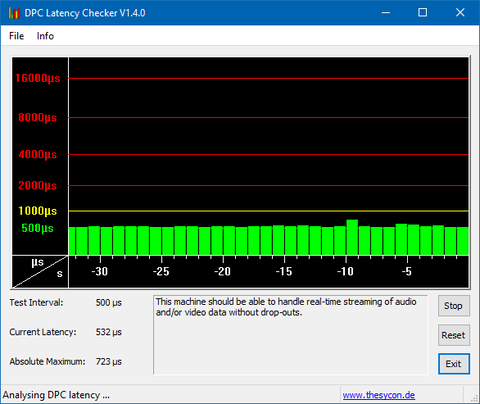
A CPU használat viszont továbbra is túl magas (7-11% idle), nagyon messze van még a tavalyi build 2-5%-os idle állapotától egy 4 magos i5-ön. De a Defender erőforrás zabálása megszűnt.
-
#1431
norti
addikt
Milestone2
#1430
válasz
Milestone2
#1430
üzenetére
Fórumokon is sokat panaszkodnak, hogy laggy a GUI, amit én is észreveszek egy idő után (fél-egy nap bekapcsolt állapot). Amúgy Netflix, Twitch kliensek streamje is akad, plusz a játékoknál újra előfordulnak mikrolagok, akadások (gamebar és egyéb funkciói továbbra is kikapcsolva), tehát megint vmi grafikus alrendszer bug van (esetleg még a Defender se jó)
-
Cumulative Update Build 16299.20 (KB4043961) is currently rolling out to Windows Insiders running Build 16299.15. This update only includes quality improvements and no new OS features. Key improvements include:
- Addressed issue where, after removing apps, they’re reinstalled on every restart, logoff, and login.
- Addressed issue where localization of the error output from a JET database is broken. Only English error strings are reported.
- Security updates to Windows kernel-mode drivers, Microsoft Graphics Component, Internet Explorer, Windows kernel, Microsoft Windows Search Component, Windows TPM, Windows NTLM, Device Guard, Microsoft Scripting Engine, Windows Wireless Networking, Microsoft Windows DNS, Windows Server, Microsoft JET Database Engine, and the Windows SMB Server -
válasz
westlake
#1420
üzenetére
Van egy "kis" hiba az UUP-vel, pl. language specifikus buildeknél nem léteznek a nyelvi ESD-k a Microsoft szerverein (legalábbis x64 buildnél, armnál pl. ott vannak) és nagyon szép hibákat dobál a WU
Valamit nagyon megkutyultak most, de már írták twitteren, hogy rajta vannak az ügyön x64:
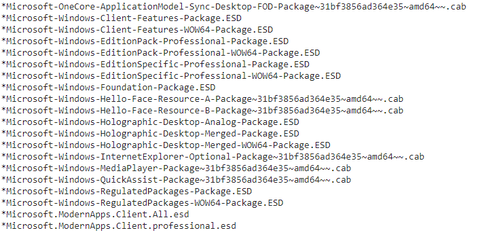
arm64: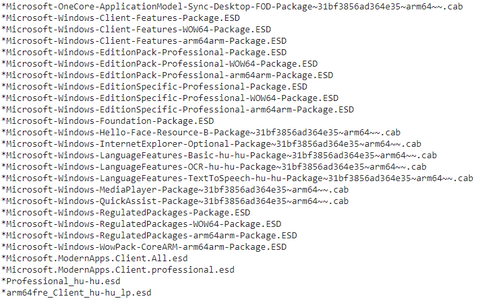
Itt a tenforums thread is.
-
Kint van release preview-n is a build + a Microsoft akaratlanul is megerősítette a feedback hub tegnapi hírében (ami a fast ring és a skip ahead egyesítéséről szól), hogy ez a végleges, ha még valaki kételkedett volna
A menu will pop up and you will need to choose “Stop Insider builds completely”. This will keep you on the Windows 10 Fall Creators Update (Build 16299.15).
-
Announcing Windows 10 Insider Preview Build 16294 for PC
This build has the fix for the bug that was causing some Surface Pro 3 devices to end up in a “unbootable” state where the Windows OS will not load and it appears to be stuck on a “spinning dots” screen. After installing this build, Surface Pro 3 devices should no longer get into this state. If you have a Surface Pro 3 in a bad state – follow the instructions on this forum post to get back up and running.
We fixed an issue on Dutch builds where explorer could go into a crash loop if an app-requested downloads notification popped up from OneDrive.
We fixed an issue where expand.exe couldn’t expand CABs that contained Japanese characters in the file name.
We fixed a race condition that could result in window content being transparent (but showing the window frame) or stale after unlocking your desktop.
We fixed an issue resulting in some Insiders seeing error 0x800B010C when attempting to upgrade to the last few flights.16300 lesz az RTM build?
-
Nálam annak ellenére rakta vissza ezt a meg nem jelent drivert, hogy le volt tiltva az automatikus driver update. Ahogy néztem Windows frissítésként kezeli és nem driver update-ként. Nem tudom, mit akarnak ezzel elérni, de az utóbbi időben minden egyes build után újra kellett rakni a vga drivert, mert nem volt megfelelően telepítve, pl. a Geforce Experience sem látta a verziót, játékok akadtak.
-
Az újabb fast ring buildekkel új nvidia driver (387.68) is települ, ami nem biztos, hogy a legstabilabb... Itt még megértem, hogy erőszakosan telepíti a Microsoft, mert teszt build, de ha ezt a végleges változaton is megteszi, kikapcsolt automatikus driver telepítés mellett is, abból megint botrány lesz.
-
válasz
 sulu1701
#1338
üzenetére
sulu1701
#1338
üzenetére
Szia
Elvileg a 384.76 utáni driverekkel mind kell működjön a 4K, próbáld ki a legújabbal (385.41), DDU-val leszedve a régit/windowsost és utána felrakva (Windows automatikus driver telepítését kikapcsolva, de ezt a DDU is megteszi tisztításkor).
ISO-t Insider Preview-ból itt találsz, de az nem a legfrisebb (16251-es build), utána le fogja tölteni azt a Windows Update ringtől függően a legfrissebbet.


 De tényleg nem működik még a váltás...


Új hozzászólás Aktív témák

- MS SQL Server 2016, 2017, 2019
- Adobe Előfizetések - Adobe Creative Cloud All Apps - 12 Hónap - 15% AKCIÓ
- Bitdefender Total Security 3év/3eszköz! - Tökéletes védelem, Most Ünnepi áron! :)
- Game Pass Ultimate előfizetések 1 - 36 hónapig azonnali kézbesítéssel a LEGOLCSÓBBAN! AKCIÓ!
- Vírusirtó, Antivirus, VPN kulcsok GARANCIÁVAL!
- ÁRGARANCIA! Épített KomPhone Ultra 7 265KF 32/64GB RAM RX 9070 16GB GAMER PC termékbeszámítással
- Telefon Felvásárlás!! iPhone 14/iPhone 14 Plus/iPhone 14 Pro/iPhone 14 Pro Max
- Új Steelseries Arctis Nova pro vezetékes gamer fejhallgató
- DELL PowerEdge R730xd 16LFF 160TB+400GB 2U rack - 2xE5-2683v4 (16c/32t),256GB RAM,2x10G NET,HBA330
- BESZÁMÍTÁS! MSI B760 i7 13700K 32GB DDR4 2TB SSD RTX 4080 16GB be quiet! 500DX Seasonic 750W
Állásajánlatok

Cég: PCMENTOR SZERVIZ KFT.
Város: Budapest

Cég: Laptopszaki Kft.
Város: Budapest