Phone calls, basic functions
Making phone calls is an exciting experience with the handset, given its size. After concluding my first calls I have ascertained that even with the volume being maximized I can still barely hear the person on the other end of the line. Then I started looking for the phone’s speaker, but I did not find it. Then I have realized: the built-in handsfree speaker is the one, thus when making phone calls on has to hold the phone inversely, with it’s back facing our ears. This way our fellows on the public transport can not only hear our private conversations but can also see who we are talking to; cheers for evolution! Holding the phone this way there were of course no problems with the volume, but there was with the microphone: everyone was complaining about "echoing", meaning that they were also hearing themselves when talking with me. It is also funny, that there is no option for sending the caller ID or not and since my SIM card is set by default to not to send it, my contacts were receiving a hidden number for a week; it was a real experience. It is also a painful loss, that the N2 does not have a built-in handsfree.

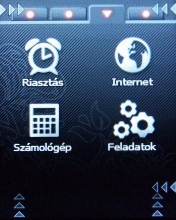
The menu has a grid layout, with 2 x 3 icons displayed per page, on three pages, the fourth tab is named Links, this is a kind of shortcut menu. The infrared grid is precise enough to clearly distinguish the 6 icons appearing on one page, it never happened that something different started from what I wanted.



The capacity of the phonebook is unknown, but I find it likely that only the amount of free memory is the limit. The number of extra fields per contact is as much as stars on the sky, we can even define a second surname and photos and ringtones can also be associated with every entry. There is a quick-access tab in the phonebook, where we can store six of our contacts – it’s use is highly recommended, as scrolling is quite slow, and in case of many thousand names it takes a while to reach the bottom of the list, because the highlight won’t jump to the end of the list when scrolling upwards.


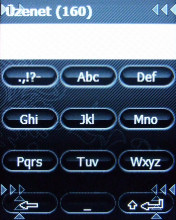
Text entry is possible with the help of the virtual keyboard. This looks just like the ones on standard mobile phones, a button represents three letters, there is the 0, the space, etc. When tapping the buttons the phone gives us feedback in form a vibration, which is all right, but in case of the second and third rows the system didn’t always recognize which button I wanted to press, so there were some misspells, but basically this is a viable solution. We can store maximum 500 SMS messages; I did not find, however, any information regarding the maximum size of MMS messages. Sending text messages is quite an uncertain procedure, sometimes the N2 was unwilling to send them, in this cases only a restart helped.

A cikk még nem ért véget, kérlek, lapozz!








